A datagram is an independent, self-contained message sent over the network whose arrival, arrival time, and content are not guaranteed. It's simple exampls of Datagram/UDP Client and Server, modified from Java Tutorial - Writing a Datagram Client and Server.
It's assumed both server and client run on the same Raspberry Pi, so the IP is fixed "127.0.0.1", local loopback. And the port is arbitrarily chosen 4445.
In the Server side, JavaUdpServer.java, creates a DatagramSocket on port 4445. Wait for client connect, and reply with current date/time.
import java.io.IOException;
import java.net.DatagramPacket;
import java.net.DatagramSocket;
import java.net.InetAddress;
import java.util.Date;

/*
reference:
https://docs.oracle.com/javase/tutorial/networking/datagrams/clientServer.html
*/
public class JavaUdpServer {

    static UdpServerThread udpServerThread;

    public static void main(String[] args) throws IOException {
        System.out.println("Server start");
        System.out.println("Runtime Java: "
                + System.getProperty("java.runtime.version"));


        new UdpServerThread().start();
    }

    private static class UdpServerThread extends Thread{

        final int serverport = 4445;

        protected DatagramSocket socket = null;

        public UdpServerThread() throws IOException {
            this("UdpServerThread");
        }

        public UdpServerThread(String name) throws IOException {
            super(name);
            socket = new DatagramSocket(serverport);
            System.out.println("JavaUdpServer run on: " + serverport);
        }

        @Override
        public void run() {

            while(true){

                try {
                    byte[] buf = new byte[256];

                    // receive request
                    DatagramPacket packet = new DatagramPacket(buf, buf.length);
                    socket.receive(packet);

                    String dString = new Date().toString();
                    buf = dString.getBytes();

                    // send the response to the client at "address" and "port"
                    InetAddress address = packet.getAddress();
                    int port = packet.getPort();
                    System.out.println("Request from: " + address + ":" + port);
                    packet = new DatagramPacket(buf, buf.length, address, port);
                    socket.send(packet);

                } catch (IOException ex) {
                    System.out.println(ex.toString());
                }

            }

        }

    }

}
In the client side, JavaUdpClient.java, sends a request to the Server, and waits for the response.
import java.io.IOException;
import java.net.DatagramPacket;
import java.net.DatagramSocket;
import java.net.InetAddress;
import java.net.SocketException;
import java.net.UnknownHostException;

/*
reference:
https://docs.oracle.com/javase/tutorial/networking/datagrams/clientServer.html
*/
public class JavaUdpClient {

    public static void main(String[] args)
            throws UnknownHostException, SocketException, IOException {

        //Hardcode ip:port
        String ipLocalLoopback = "127.0.0.1";
        int serverport = 4445;


        System.out.println("Runtime Java: "
                + System.getProperty("java.runtime.version"));
        System.out.println("JavaUdpClient running, connect to: "
                + ipLocalLoopback + ":" + serverport);

        // get a datagram socket
        DatagramSocket socket = new DatagramSocket();

        // send request
        byte[] buf = new byte[256];
        InetAddress address = InetAddress.getByName(ipLocalLoopback);
        DatagramPacket packet =
                new DatagramPacket(buf, buf.length, address, serverport);
        socket.send(packet);

        // get response
        packet = new DatagramPacket(buf, buf.length);
        socket.receive(packet);

        String received = new String(packet.getData(), 0, packet.getLength());
        System.out.println(received);

        socket.close();
    }

}
public boolean isReachable(int timeout) throws IOException
Test whether that address is reachable. Best effort is made by the implementation to try to reach the host, but firewalls and server configuration may block requests resulting in a unreachable status while some specific ports may be accessible. A typical implementation will use ICMP ECHO REQUESTs if the privilege can be obtained, otherwise it will try to establish a TCP connection on port 7 (Echo) of the destination host. The timeout value, in milliseconds, indicates the maximum amount of time the try should take. If the operation times out before getting an answer, the host is deemed unreachable. A negative value will result in an IllegalArgumentException being thrown.
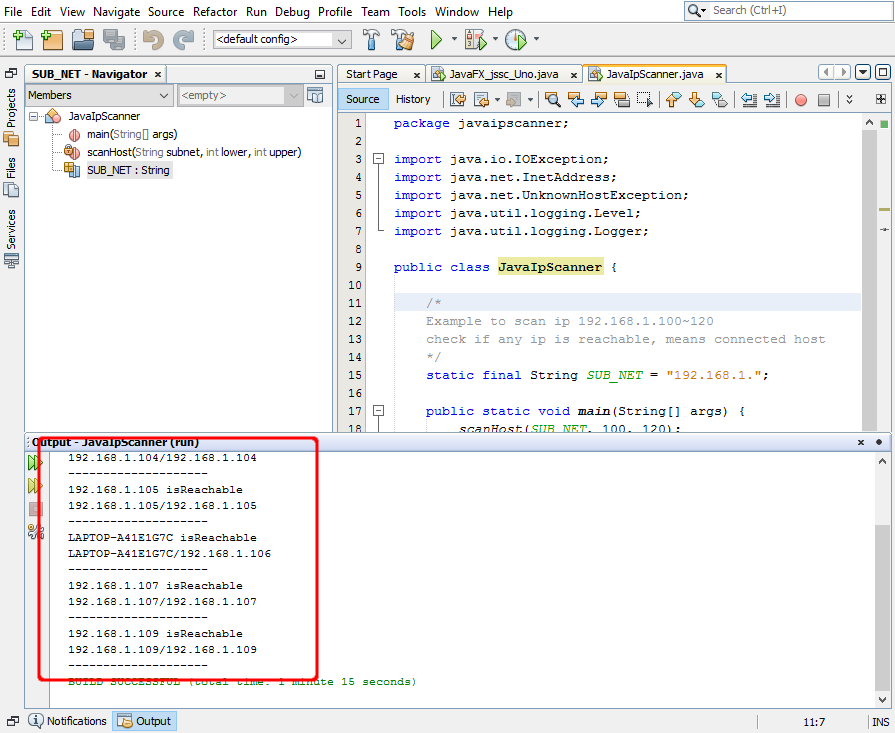
JavaIpScanner.java
package javaipscanner;

import java.io.IOException;
import java.net.InetAddress;
import java.net.UnknownHostException;
import java.util.logging.Level;
import java.util.logging.Logger;

public class JavaIpScanner {

    /*
    Example to scan ip 192.168.1.100~120
    check if any ip is reachable, means connected host
    */
    static final String SUB_NET = "192.168.1.";

    public static void main(String[] args) {
        scanHost(SUB_NET, 100, 120);
    }

    private static void scanHost(String subnet, int lower, int upper) {
        final int timeout = 3000;

        for (int i = lower; i <= upper; i++) {
            String host = subnet + i;
            try {
                InetAddress inetAddress = InetAddress.getByName(host);

                if (inetAddress.isReachable(timeout)){
                    System.out.println(inetAddress.getHostName()
                            + " isReachable");
                    System.out.println(inetAddress.toString());
                    System.out.println("--------------------");
                }

            } catch (UnknownHostException ex) {
                Logger.getLogger(JavaIpScanner.class.getName())
                        .log(Level.SEVERE, null, ex);
            } catch (IOException ex) {
                Logger.getLogger(JavaIpScanner.class.getName())
                        .log(Level.SEVERE, null, ex);
            }
        }
    }

}
In the previous exercise of "client and server to communicate using Socket", the host.java stay waiting request from client.java, and terminate after responsed. In this step, it's modified to stay in loop, for next request; until user press Ctrl+C to terminate the program.
host stey in loop, until Ctrl+C.
import java.io.IOException;
import java.io.OutputStream;
import java.io.PrintStream;
import java.net.ServerSocket;
import java.net.Socket;

public class host {

    public static void main(String srgs[]) {

        int count = 0;

        //hard code to use port 8080
        try (ServerSocket serverSocket = new ServerSocket(8080)) {
            System.out.println("I'm waiting here: "
                + serverSocket.getLocalPort());

            System.out.println(
                "This program will stay monitoring port 80.");
            System.out.println(
                "Until user press Ctrl+C to terminate.");

            while (true) {
                try (Socket socket = serverSocket.accept()) {
                    count++;
                    System.out.println("#" + count + " from "
                            + socket.getInetAddress() + ":"
                            + socket.getPort());
                    OutputStream outputStream = socket.getOutputStream();
                    try (PrintStream printStream =
                        new PrintStream(outputStream)) {
                            printStream.print(
                                "Hello from Raspberry Pi, you are #"
                                + count);
                    }
                } catch (IOException ex) {
                    System.out.println(ex.toString());
                }
            }
        } catch (IOException ex) {
            System.out.println(ex.toString());
        }
    }
}