

Here is photo samples by Pi NoIR Camera Module with, Infrared filter 680nm (China brand), and 720nm (Hoya R72).


For the test, I create a Python script (for Python 2). All photos by the default setting:
myPiCam.py
import picamera
import Tkinter as tk
import ttk
import time
from PIL import ImageTk, Image
from threading import Thread
import io
import sys
from pkg_resources import require
from fractions import Fraction
from time import sleep

#reference:
# http://picamera.readthedocs.org/en/latest/api_camera.html

RQS_0=0
RQS_QUIT=1
RQS_CAPTURE=2
rqs=RQS_0
rqsUpdateSetting=True

def camHandler():
    global rqs
    rqs = RQS_0

    camera = picamera.PiCamera()
    #stream = io.BytesIO()

    #set default
    camera.sharpness = 0
    camera.contrast = 0
    camera.brightness = 50
    camera.saturation = 0
    camera.ISO = 0
    camera.video_stabilization = False
    camera.exposure_compensation = 0
    camera.exposure_mode = 'auto'
    camera.meter_mode = 'average'
    camera.awb_mode = 'auto'
    camera.image_effect = 'none'
    camera.color_effects = None
    #camera.rotation = 0
    camera.rotation = 270
    camera.hflip = False
    camera.vflip = False
    camera.crop = (0.0, 0.0, 1.0, 1.0)
    #camera.resolution = (1024, 768)
    camera.resolution = (400, 300)
    #end of set default
    #camera.start_preview()

    while rqs != RQS_QUIT:
        #check if need update setting
        global rqsUpdateSetting
        if rqsUpdateSetting == True:
            rqsUpdateSetting = False
            camera.sharpness = scaleSharpness.get()
            camera.contrast = scaleContrast.get()
            camera.brightness = scaleBrightness.get()
            camera.saturation = scaleSaturation.get()
            camera.exposure_compensation = scaleExpCompensation.get()
            camera.iso = varIso.get()
            camera.drc_strength = varDrc.get()
            camera.exposure_mode = varExpMode.get()
            camera.meter_mode = varMeterMode.get()
            camera.rotation = varRotation.get()
            camera.vflip = varVFlip.get()
            camera.hflip = varHFlip.get()
            camera.image_denoise = varDenoise.get()

            awb_mode_setting = varAwbMode.get()
            labelAwbVar.set(awb_mode_setting)
            camera.awb_mode = awb_mode_setting

            if awb_mode_setting == "off":
                gr = scaleGainRed.get()
                gb = scaleGainBlue.get()
                gAwb = (gr, gb)
                camera.awb_gains = gAwb
                labelAwbVar.set(awb_mode_setting + " : "
                    + str(gAwb))

            image_effect_setting = varImageEffect.get()
            labelImageEffectVar.set(image_effect_setting)
            camera.image_effect = image_effect_setting

            if image_effect_setting == 'solarize':
                if cbSolarize_yuv_Var.get():
                    yuv = 1
                else:
                    yuv = 0
                solarize_para = (
                    yuv,
                    scSolarize_x0_Var.get(),
                    scSolarize_y0_Var.get(),
                    scSolarize_y1_Var.get(),
                    scSolarize_y2_Var.get())
                labelImageEffectVar.set(image_effect_setting + " " + str(solarize_para))
                camera.image_effect_params = solarize_para
            elif image_effect_setting == 'colorpoint':
                camera.image_effect_params = quadrantVar.get()
                labelImageEffectVar.set(image_effect_setting + " " + str(quadrantVar.get()))
            elif image_effect_setting == 'colorbalance':
                colorbalance_para = (
                    scColorbalance_lens_Var.get(),
                    scColorbalance_r_Var.get(),
                    scColorbalance_g_Var.get(),
                    scColorbalance_b_Var.get(),
                    scColorbalance_u_Var.get(),
                    scColorbalance_v_Var.get())
                labelImageEffectVar.set(image_effect_setting + " " + str(colorbalance_para))
                camera.image_effect_params = colorbalance_para
            elif image_effect_setting == 'colorswap':
                labelImageEffectVar.set(image_effect_setting + " " + str(cbColorswap_dir_Var.get()))
                camera.image_effect_params = cbColorswap_dir_Var.get()
            elif image_effect_setting == 'posterise':
                labelImageEffectVar.set(image_effect_setting + " " + str(scPosterise_steps_Var.get()))
                camera.image_effect_params = scPosterise_steps_Var.get()
            elif image_effect_setting == 'blur':
                labelImageEffectVar.set(image_effect_setting + " " + str(scBlur_size_Var.get()))
                camera.image_effect_params = scBlur_size_Var.get()
            elif image_effect_setting == 'film':
                film_para = (
                    scFilm_strength_Var.get(),
                    scFilm_u_Var.get(),
                    scFilm_v_Var.get())
                labelImageEffectVar.set(image_effect_setting + " " + str(film_para))
                camera.image_effect_params = film_para
            elif image_effect_setting == 'watercolor':
                if cbWatercolor_uv_Var.get():
                    watercolor_para = (
                        scWatercolor_u_Var.get(),
                        scWatercolor_v_Var.get())
                    labelImageEffectVar.set(image_effect_setting + " " + str(watercolor_para))
                    camera.image_effect_params = watercolor_para
                else:
                    watercolor_para = ()
                    labelImageEffectVar.set(image_effect_setting + " " + str(watercolor_para))
                    camera.image_effect_params = watercolor_para

        if rqs == RQS_CAPTURE:
            print("Capture")
            rqs=RQS_0
            timeStamp = time.strftime("%Y%m%d-%H%M%S")
            jpgFile='img_'+timeStamp+'.jpg'

            #camera.resolution = (2592, 1944)    #set photo size

            varRes = varResolution.get()
            if varRes == '640x480':
                settingResolution = (640, 480)
            elif varRes == '800x600':
                settingResolution = (800, 600)
            elif varRes == '1280x720':
                settingResolution = (1280, 720)
            elif varRes == '1296x730':
                settingResolution = (1296, 730)
            elif varRes == '1296x972':
                settingResolution = (1296, 972)
            elif varRes == '1600x1200':
                settingResolution = (1600, 1200)
            elif varRes == '1920x1080':
                settingResolution = (1920, 1080)
            else:
                settingResolution = (2592, 1944)

            camera.resolution = settingResolution

            shutterSpeedSetting = varShutterSpeed.get()
            settingQuality = varQuality.get()

            if shutterSpeedSetting == 'normal':
                camera.capture(jpgFile, quality=settingQuality)
            else:
                orgFrameRate = camera.framerate

                if shutterSpeedSetting == '6 sec':
                    camera.framerate = Fraction(1, 6)
                    camera.shutter_speed = 6000000
                elif shutterSpeedSetting == '5 sec':
                    camera.framerate = Fraction(1, 5)
                    camera.shutter_speed = 5000000
                elif shutterSpeedSetting == '4 sec':
                    camera.framerate = Fraction(1, 4)
                    camera.shutter_speed = 4000000
                elif shutterSpeedSetting == '3 sec':
                    camera.framerate = Fraction(1, 3)
                    camera.shutter_speed = 3000000
                elif shutterSpeedSetting == '2 sec':
                    camera.framerate = Fraction(1, 2)
                    camera.shutter_speed = 2000000
                elif shutterSpeedSetting == '1 sec':
                    camera.framerate = Fraction(1, 1)
                    camera.shutter_speed = 1000000
                elif shutterSpeedSetting == '1/2 sec':
                    camera.framerate = Fraction(1, 1)
                    camera.shutter_speed = 500000
                elif shutterSpeedSetting == '1/4 sec':
                    camera.framerate = Fraction(1, 1)
                    camera.shutter_speed = 250000
                #sleep(1)
                camera.capture(jpgFile, quality=settingQuality)
                camera.framerate = orgFrameRate
                camera.shutter_speed = 0

            camera.resolution = (400, 300)      #resume preview size

            labelCapVal.set(jpgFile)
        else:
            stream = io.BytesIO()
            camera.capture(stream, format='jpeg', quality=40)
            stream.seek(0)
            tmpImage = Image.open(stream)
            tmpImg = ImageTk.PhotoImage(tmpImage)
            previewPanel.configure(image = tmpImg)
            #sleep(0.5)

    print("Quit")
    #camera.stop_preview()

def startCamHandler():
    camThread = Thread(target=camHandler)
    camThread.start()

def quit():
    global rqs
    rqs=RQS_QUIT

    global tkTop
    tkTop.destroy()

def capture():
    global rqs
    rqs = RQS_CAPTURE
    labelCapVal.set("capturing")

def cbScaleSetting(new_value):
    global rqsUpdateSetting
    rqsUpdateSetting = True

def cbButtons():
    global rqsUpdateSetting
    rqsUpdateSetting = True

tkTop = tk.Tk()
tkTop.wm_title("helloraspberrypi.blogspot.com")
tkTop.geometry('1000x650')

previewWin = tk.Toplevel(tkTop)
previewWin.title('Preview')
previewWin.geometry('400x300')
previewPanel = tk.Label(previewWin)
previewPanel.pack(side = "bottom", fill = "both", expand = "yes")

#tkButtonQuit = tk.Button(tkTop, text="Quit", command=quit).pack()

tkButtonCapture = tk.Button(
    tkTop, text="Capture", command=capture)
tkButtonCapture.pack()

SCALE_WIDTH = 980;

labelCapVal = tk.StringVar()
tk.Label(tkTop, textvariable=labelCapVal).pack()

notebook = ttk.Notebook(tkTop)
frame1 = ttk.Frame(notebook)
frame2 = ttk.Frame(notebook)
frame3 = ttk.Frame(notebook)
frame4 = ttk.Frame(notebook)
notebook.add(frame1, text='Setting')
notebook.add(frame2, text='White Balance')
notebook.add(frame3, text='Image Effect')
notebook.add(frame4, text='Control')
notebook.pack()

# Tab Setting
tk.Label(frame1, text=require('picamera')).pack()

scaleSharpness = tk.Scale(
    frame1,
    from_=-100, to=100,
    length=SCALE_WIDTH,
    orient=tk.HORIZONTAL,
    label="sharpness",
    command=cbScaleSetting)
scaleSharpness.set(0)
scaleSharpness.pack(anchor=tk.CENTER)

scaleContrast = tk.Scale(
    frame1,
    from_=-100, to=100,
    length=SCALE_WIDTH,
    orient=tk.HORIZONTAL,
    label="contrast",
    command=cbScaleSetting)
scaleContrast.set(0)
scaleContrast.pack(anchor=tk.CENTER)

scaleBrightness = tk.Scale(
    frame1,
    from_=0, to=100,
    length=SCALE_WIDTH,
    orient=tk.HORIZONTAL,
    label="brightness",
    command=cbScaleSetting)
scaleBrightness.set(50)
scaleBrightness.pack(anchor=tk.CENTER)

scaleSaturation = tk.Scale(
    frame1,
    from_=-100, to=100,
    length=SCALE_WIDTH,
    orient=tk.HORIZONTAL,
    label="saturation",
    command=cbScaleSetting)
scaleSaturation.set(0)
scaleSaturation.pack(anchor=tk.CENTER)

scaleExpCompensation = tk.Scale(
    frame1,
    from_=-25, to=25,
    length=SCALE_WIDTH,
    orient=tk.HORIZONTAL,
    label="exposure_compensation",
    command=cbScaleSetting)
scaleExpCompensation.set(0)
scaleExpCompensation.pack(anchor=tk.CENTER)

lfExpMode = ttk.LabelFrame(frame1, text="Exposure Mode")
lfExpMode.pack(fill="x")
varExpMode = tk.StringVar()
varExpMode.set('auto')
tk.Radiobutton(lfExpMode, variable=varExpMode,
        text='off',value='off',command=cbButtons).pack(anchor=tk.W, side=tk.LEFT)
tk.Radiobutton(lfExpMode, variable=varExpMode,
        text='auto',value='auto',command=cbButtons).pack(anchor=tk.W, side=tk.LEFT)
tk.Radiobutton(lfExpMode, variable=varExpMode,
        text='night',value='night',command=cbButtons).pack(anchor=tk.W, side=tk.LEFT)
tk.Radiobutton(lfExpMode, variable=varExpMode,
        text='nightpreview',value='nightpreview',command=cbButtons).pack(anchor=tk.W, side=tk.LEFT)
tk.Radiobutton(lfExpMode, variable=varExpMode,
        text='backlight',value='backlight',command=cbButtons).pack(anchor=tk.W, side=tk.LEFT)
tk.Radiobutton(lfExpMode, variable=varExpMode,
        text='spotlight',value='spotlight',command=cbButtons).pack(anchor=tk.W, side=tk.LEFT)
tk.Radiobutton(lfExpMode, variable=varExpMode,
        text='sports',value='sports',command=cbButtons).pack(anchor=tk.W, side=tk.LEFT)
tk.Radiobutton(lfExpMode, variable=varExpMode,
        text='snow',value='snow',command=cbButtons).pack(anchor=tk.W, side=tk.LEFT)
tk.Radiobutton(lfExpMode, variable=varExpMode,
        text='beach',value='beach',command=cbButtons).pack(anchor=tk.W, side=tk.LEFT)
tk.Radiobutton(lfExpMode, variable=varExpMode,
        text='verylong',value='verylong',command=cbButtons).pack(anchor=tk.W, side=tk.LEFT)
tk.Radiobutton(lfExpMode, variable=varExpMode,
        text='fixedfps',value='fixedfps',command=cbButtons).pack(anchor=tk.W, side=tk.LEFT)
tk.Radiobutton(lfExpMode, variable=varExpMode,
        text='antishake',value='antishake',command=cbButtons).pack(anchor=tk.W, side=tk.LEFT)
tk.Radiobutton(lfExpMode, variable=varExpMode,
        text='fireworks',value='fireworks',command=cbButtons).pack(anchor=tk.W, side=tk.LEFT)

lfMeterMode = ttk.LabelFrame(frame1, text="Meter Mode")
lfMeterMode.pack(fill="x")
varMeterMode = tk.StringVar()
varMeterMode.set('average')
tk.Radiobutton(lfMeterMode, variable=varMeterMode,
        text='average',value='average',command=cbButtons).pack(anchor=tk.W, side=tk.LEFT)
tk.Radiobutton(lfMeterMode, variable=varMeterMode,
        text='spot',value='spot',command=cbButtons).pack(anchor=tk.W, side=tk.LEFT)
tk.Radiobutton(lfMeterMode, variable=varMeterMode,
        text='backlit',value='backlit',command=cbButtons).pack(anchor=tk.W, side=tk.LEFT)
tk.Radiobutton(lfMeterMode, variable=varMeterMode,
        text='matrix',value='matrix',command=cbButtons).pack(anchor=tk.W, side=tk.LEFT)

# Tab White Balance

lfAwbMode = ttk.LabelFrame(frame2, text="awb_mode")
lfAwbMode.pack(fill="x")
lfAwbGains = ttk.LabelFrame(frame2, text="awb_gains")
lfAwbGains.pack(fill="x")

labelAwbVar = tk.StringVar()
tk.Label(lfAwbMode, textvariable=labelAwbVar).pack()

#--
AWB_MODES = [
    ("off (set by awb_gains)", "off"),
    ("auto", "auto"),
    ("sunlight", "sunlight"),
    ("cloudy", "cloudy"),
    ("shade", "shade"),
    ("tungsten", "tungsten"),
    ("fluorescent", "fluorescent"),
    ("incandescent", "incandescent"),
    ("flash", "flash"),
    ("horizon", "horizon"),
    ]

varAwbMode = tk.StringVar()
varAwbMode.set("auto")
for text, awbmode in AWB_MODES:
    awbModeBtns = tk.Radiobutton(
        lfAwbMode,
        text=text,
        variable=varAwbMode,
        value=awbmode,
        command=cbButtons)
    awbModeBtns.pack(anchor=tk.W)
#--
scaleGainRed = tk.Scale(
    lfAwbGains,
    from_=0.0, to=8.0,
    resolution=0.1,
    length=SCALE_WIDTH,
    orient=tk.HORIZONTAL,
    label="Red",
    command=cbScaleSetting)
scaleGainRed.set(0.0)
scaleGainRed.pack(anchor=tk.CENTER)

scaleGainBlue = tk.Scale(
    lfAwbGains,
    from_=0.0, to=8.0,
    resolution=0.1,
    length=SCALE_WIDTH,
    orient=tk.HORIZONTAL,
    label="Blue",
    command=cbScaleSetting)
scaleGainBlue.set(0.0)
scaleGainBlue.pack(anchor=tk.CENTER)

# Tab Image Effect
#For Image effects, ref:
#http://picamera.readthedocs.org/en/latest/api_camera.html?highlight=effect#picamera.camera.PiCamera.image_effect
labelImageEffectVar = tk.StringVar()
tk.Label(frame3, textvariable=labelImageEffectVar).pack()
#-- image_effect

varImageEffect = tk.StringVar()
varImageEffect.set('none')

lfNoParaOpts1 = ttk.Frame(frame3)
lfNoParaOpts1.pack(fill="x")

tk.Radiobutton(lfNoParaOpts1, variable=varImageEffect,
        text='none',value='none',command=cbButtons).pack(anchor=tk.W, side=tk.LEFT)
tk.Radiobutton(lfNoParaOpts1, variable=varImageEffect,
        text='negative',value='negative',command=cbButtons).pack(anchor=tk.W, side=tk.LEFT)
tk.Radiobutton(lfNoParaOpts1, variable=varImageEffect,
        text='sketch',value='sketch',command=cbButtons).pack(anchor=tk.W, side=tk.LEFT)
tk.Radiobutton(lfNoParaOpts1, variable=varImageEffect,
        text='denoise',value='denoise',command=cbButtons).pack(anchor=tk.W, side=tk.LEFT)
tk.Radiobutton(lfNoParaOpts1, variable=varImageEffect,
        text='emboss',value='emboss',command=cbButtons).pack(anchor=tk.W, side=tk.LEFT)
tk.Radiobutton(lfNoParaOpts1, variable=varImageEffect,
        text='oilpaint',value='oilpaint',command=cbButtons).pack(anchor=tk.W, side=tk.LEFT)
tk.Radiobutton(lfNoParaOpts1, variable=varImageEffect,
        text='hatch',value='hatch',command=cbButtons).pack(anchor=tk.W, side=tk.LEFT)
tk.Radiobutton(lfNoParaOpts1, variable=varImageEffect,
        text='gpen',value='gpen',command=cbButtons).pack(anchor=tk.W, side=tk.LEFT)

lfNoParaOpts2 = ttk.Frame(frame3)
lfNoParaOpts2.pack(fill="x")
tk.Radiobutton(lfNoParaOpts2, variable=varImageEffect,
        text='pastel',value='pastel',command=cbButtons).pack(anchor=tk.W, side=tk.LEFT)
tk.Radiobutton(lfNoParaOpts2, variable=varImageEffect,
        text='saturation',value='saturation',command=cbButtons).pack(anchor=tk.W, side=tk.LEFT)
tk.Radiobutton(lfNoParaOpts2, variable=varImageEffect,
        text='washedout',value='washedout',command=cbButtons).pack(anchor=tk.W, side=tk.LEFT)
tk.Radiobutton(lfNoParaOpts2, variable=varImageEffect,
        text='cartoon',value='cartoon',command=cbButtons).pack(anchor=tk.W, side=tk.LEFT)
tk.Radiobutton(lfNoParaOpts2, variable=varImageEffect,
        text='deinterlace1',value='deinterlace1',command=cbButtons).pack(anchor=tk.W, side=tk.LEFT)
tk.Radiobutton(lfNoParaOpts2, variable=varImageEffect,
        text='deinterlace2',value='deinterlace2',command=cbButtons).pack(anchor=tk.W, side=tk.LEFT)

lfSolarize = ttk.LabelFrame(frame3, text="solarize")
lfSolarize.pack(fill="x")

tk.Radiobutton(lfSolarize, variable=varImageEffect,
        text='solarize',value='solarize',command=cbButtons).pack(anchor=tk.W, side=tk.LEFT)

cbSolarize_yuv_Var = tk.BooleanVar()
tk.Checkbutton(lfSolarize, text="yuv",
    variable=cbSolarize_yuv_Var, command=cbButtons).pack(anchor=tk.W, side=tk.LEFT)

scSolarize_x0_Var = tk.IntVar()
scSolarize_x0_Var.set(128)
tk.Scale(lfSolarize, from_=0, to=255,
    orient=tk.HORIZONTAL, length=200, label="x0",
    variable=scSolarize_x0_Var, command=cbScaleSetting).pack(anchor=tk.W, side=tk.LEFT)

scSolarize_y0_Var = tk.IntVar()
scSolarize_y0_Var.set(128)
tk.Scale(lfSolarize, from_=0, to=255,
    orient=tk.HORIZONTAL, length=200, label="y0",
    variable=scSolarize_y0_Var, command=cbScaleSetting).pack(anchor=tk.W, side=tk.LEFT)

scSolarize_y1_Var = tk.IntVar()
scSolarize_y1_Var.set(128)
tk.Scale(lfSolarize, from_=0, to=255,
    orient=tk.HORIZONTAL, length=200, label="y1",
    variable=scSolarize_y1_Var, command=cbScaleSetting).pack(anchor=tk.W, side=tk.LEFT)

scSolarize_y2_Var = tk.IntVar()
scSolarize_y2_Var.set(0)
tk.Scale(lfSolarize, from_=0, to=255,
    orient=tk.HORIZONTAL, length=200, label="y2",
    variable=scSolarize_y2_Var, command=cbScaleSetting).pack(anchor=tk.W, side=tk.LEFT)

lfwatercolor = ttk.LabelFrame(frame3, text="watercolor")
lfwatercolor.pack(fill="x")
tk.Radiobutton(lfwatercolor, variable=varImageEffect,
        text='watercolor',value='watercolor',command=cbButtons).pack(anchor=tk.W, side=tk.LEFT)

cbWatercolor_uv_Var = tk.BooleanVar()
cbWatercolor_uv_Var.set(False)
tk.Checkbutton(lfwatercolor, text="uv",
    variable=cbWatercolor_uv_Var, command=cbButtons).pack(anchor=tk.W, side=tk.LEFT)

scWatercolor_u_Var = tk.IntVar()
scWatercolor_u_Var.set(0)
tk.Scale(lfwatercolor, from_=0, to=255,
    orient=tk.HORIZONTAL, length=200, label="u",
    variable=scWatercolor_u_Var, command=cbScaleSetting).pack(anchor=tk.W, side=tk.LEFT)
scWatercolor_v_Var = tk.IntVar()
scWatercolor_v_Var.set(0)
tk.Scale(lfwatercolor, from_=0, to=255,
    orient=tk.HORIZONTAL, length=200, label="v",
    variable=scWatercolor_v_Var, command=cbScaleSetting).pack(anchor=tk.W, side=tk.LEFT)

lffilm = ttk.LabelFrame(frame3, text="film")
lffilm.pack(fill="x")
tk.Radiobutton(lffilm, variable=varImageEffect,
        text='film',value='film',command=cbButtons).pack(anchor=tk.W, side=tk.LEFT)

scFilm_strength_Var = tk.IntVar()
scFilm_strength_Var.set(0)
tk.Scale(lffilm, from_=0, to=255,
    orient=tk.HORIZONTAL, length=200, label="strength",
    variable=scFilm_strength_Var, command=cbScaleSetting).pack(anchor=tk.W, side=tk.LEFT)
scFilm_u_Var = tk.IntVar()
scFilm_u_Var.set(0)
tk.Scale(lffilm, from_=0, to=255,
    orient=tk.HORIZONTAL, length=200, label="u",
    variable=scFilm_u_Var, command=cbScaleSetting).pack(anchor=tk.W, side=tk.LEFT)
scFilm_v_Var = tk.IntVar()
scFilm_v_Var.set(0)
tk.Scale(lffilm, from_=0, to=255,
    orient=tk.HORIZONTAL, length=200, label="v",
    variable=scFilm_v_Var, command=cbScaleSetting).pack(anchor=tk.W, side=tk.LEFT)

lfblur = ttk.LabelFrame(frame3, text="blur")
lfblur.pack(fill="x")
tk.Radiobutton(lfblur, variable=varImageEffect,
        text='blur',value='blur',command=cbButtons).pack(anchor=tk.W, side=tk.LEFT)
scBlur_size_Var = tk.IntVar()
scBlur_size_Var.set(1)
tk.Scale(lfblur, from_=1, to=2,
    orient=tk.HORIZONTAL, length=100, label="size",
    variable=scBlur_size_Var, command=cbScaleSetting).pack(anchor=tk.W, side=tk.LEFT)

lfcolorswap = ttk.LabelFrame(frame3, text="colorswap")
lfcolorswap.pack(fill="x")
tk.Radiobutton(lfcolorswap, variable=varImageEffect,
        text='colorswap',value='colorswap',command=cbButtons).pack(anchor=tk.W, side=tk.LEFT)
cbColorswap_dir_Var = tk.BooleanVar()
cbColorswap_dir_Var.set(False)
tk.Checkbutton(lfcolorswap, text="dir - 0:RGB to BGR/1:RGB to BRG",
    variable=cbColorswap_dir_Var, command=cbButtons).pack(anchor=tk.W, side=tk.LEFT)

lfposterise = ttk.LabelFrame(frame3, text="posterise")
lfposterise.pack(fill="x")
tk.Radiobutton(lfposterise, variable=varImageEffect,
        text='posterise',value='posterise',command=cbButtons).pack(anchor=tk.W, side=tk.LEFT)
scPosterise_steps_Var = tk.IntVar()
scPosterise_steps_Var.set(4)
tk.Scale(lfposterise, from_=2, to=32,
    orient=tk.HORIZONTAL, length=200, label="steps",
    variable=scPosterise_steps_Var, command=cbScaleSetting).pack(anchor=tk.W, side=tk.LEFT)

lfcolorpoint = ttk.LabelFrame(frame3, text="colorpoint")
lfcolorpoint.pack(fill="x")
tk.Radiobutton(lfcolorpoint, variable=varImageEffect,
        text='colorpoint',value='colorpoint',command=cbButtons).pack(anchor=tk.W, side=tk.LEFT)
quadrantVar = tk.IntVar()
quadrantVar.set(0)
tk.Radiobutton(lfcolorpoint, text="green",
    variable=quadrantVar, value=0, command=cbButtons).pack(anchor=tk.W, side=tk.LEFT)
tk.Radiobutton(lfcolorpoint, text="red/yellow",
    variable=quadrantVar, value=1, command=cbButtons).pack(anchor=tk.W, side=tk.LEFT)
tk.Radiobutton(lfcolorpoint, text="blue",
    variable=quadrantVar, value=2, command=cbButtons).pack(anchor=tk.W, side=tk.LEFT)
tk.Radiobutton(lfcolorpoint, text="purple",
    variable=quadrantVar, value=3, command=cbButtons).pack(anchor=tk.W, side=tk.LEFT)

lfcolorbalance = ttk.LabelFrame(frame3, text="colorbalance: I can't see the effect!")
lfcolorbalance.pack(fill="x")
tk.Radiobutton(lfcolorbalance, variable=varImageEffect,
        text='colorbalance',value='colorbalance',command=cbButtons).pack(anchor=tk.W, side=tk.LEFT)

scColorbalance_lens_Var = tk.DoubleVar()
scColorbalance_lens_Var.set(0)
tk.Scale(lfcolorbalance, from_=0, to=256,
    orient=tk.HORIZONTAL, length=140, label="lens",
    variable=scColorbalance_lens_Var, command=cbScaleSetting).pack(anchor=tk.W, side=tk.LEFT)

scColorbalance_r_Var = tk.DoubleVar()
scColorbalance_r_Var.set(1)
tk.Scale(lfcolorbalance, from_=0, to=256,
    orient=tk.HORIZONTAL, length=140, label="r",
    variable=scColorbalance_r_Var, command=cbScaleSetting).pack(anchor=tk.W, side=tk.LEFT)

scColorbalance_g_Var = tk.DoubleVar()
scColorbalance_g_Var.set(1)
tk.Scale(lfcolorbalance, from_=0, to=256,
    orient=tk.HORIZONTAL, length=140, label="g",
    variable=scColorbalance_g_Var, command=cbScaleSetting).pack(anchor=tk.W, side=tk.LEFT)

scColorbalance_b_Var = tk.DoubleVar()
scColorbalance_b_Var.set(1)
tk.Scale(lfcolorbalance, from_=0, to=256,
    orient=tk.HORIZONTAL, length=140, label="b",
    variable=scColorbalance_b_Var, command=cbScaleSetting).pack(anchor=tk.W, side=tk.LEFT)

scColorbalance_u_Var = tk.IntVar()
scColorbalance_u_Var.set(0)
tk.Scale(lfcolorbalance, from_=0, to=255,
    orient=tk.HORIZONTAL, length=140, label="u",
    variable=scColorbalance_u_Var, command=cbScaleSetting).pack(anchor=tk.W, side=tk.LEFT)

scColorbalance_v_Var = tk.IntVar()
scColorbalance_v_Var.set(0)
tk.Scale(lfcolorbalance, from_=0, to=255,
    orient=tk.HORIZONTAL, length=140, label="v",
    variable=scColorbalance_v_Var, command=cbScaleSetting).pack(anchor=tk.W, side=tk.LEFT)
# Tab Control

lfISO = ttk.LabelFrame(frame4, text="ISO")
lfISO.pack(fill="x")
varIso = tk.IntVar()
tk.Radiobutton(lfISO, variable=varIso,
        text='auto',value='0',command=cbButtons).pack(anchor=tk.W, side=tk.LEFT)
tk.Radiobutton(lfISO, variable=varIso,
        text='100',value='100',command=cbButtons).pack(anchor=tk.W, side=tk.LEFT)
tk.Radiobutton(lfISO, variable=varIso,
        text='200',value='200',command=cbButtons).pack(anchor=tk.W, side=tk.LEFT)
tk.Radiobutton(lfISO, variable=varIso,
        text='320',value='320',command=cbButtons).pack(anchor=tk.W, side=tk.LEFT)
tk.Radiobutton(lfISO, variable=varIso,
        text='400',value='400',command=cbButtons).pack(anchor=tk.W, side=tk.LEFT)
tk.Radiobutton(lfISO, variable=varIso,
        text='500',value='500',command=cbButtons).pack(anchor=tk.W, side=tk.LEFT)
tk.Radiobutton(lfISO, variable=varIso,
        text='640',value='640',command=cbButtons).pack(anchor=tk.W, side=tk.LEFT)
tk.Radiobutton(lfISO, variable=varIso,
        text='800',value='800',command=cbButtons).pack(anchor=tk.W, side=tk.LEFT)

lfDRC = ttk.LabelFrame(frame4, text="Dynamic Range Compression")
lfDRC.pack(fill="x")
varDrc = tk.StringVar()
varDrc.set('off')
tk.Radiobutton(lfDRC, variable=varDrc,
        text='off',value='off',command=cbButtons).pack(anchor=tk.W, side=tk.LEFT)
tk.Radiobutton(lfDRC, variable=varDrc,
        text='low',value='low',command=cbButtons).pack(anchor=tk.W, side=tk.LEFT)
tk.Radiobutton(lfDRC, variable=varDrc,
        text='medium',value='medium',command=cbButtons).pack(anchor=tk.W, side=tk.LEFT)
tk.Radiobutton(lfDRC, variable=varDrc,
        text='high',value='high',command=cbButtons).pack(anchor=tk.W, side=tk.LEFT)

lfRotation = ttk.LabelFrame(frame4, text="Rotation")
lfRotation.pack(fill="x")
varRotation = tk.IntVar()
varRotation.set(270)
tk.Radiobutton(lfRotation, variable=varRotation,
        text='0',value='0',command=cbButtons).pack(anchor=tk.W, side=tk.LEFT)
tk.Radiobutton(lfRotation, variable=varRotation,
        text='90',value='90',command=cbButtons).pack(anchor=tk.W, side=tk.LEFT)
tk.Radiobutton(lfRotation, variable=varRotation,
        text='180',value='180',command=cbButtons).pack(anchor=tk.W, side=tk.LEFT)
tk.Radiobutton(lfRotation, variable=varRotation,
        text='270',value='270',command=cbButtons).pack(anchor=tk.W, side=tk.LEFT)


lfFlip = ttk.LabelFrame(frame4, text="Flip")
lfFlip.pack(fill="x")
varHFlip = tk.BooleanVar()
varHFlip.set(False)
tk.Checkbutton(lfFlip, text="hflip",
    variable=varHFlip, command=cbButtons).pack(anchor=tk.W, side=tk.LEFT)
varVFlip = tk.BooleanVar()
varVFlip.set(False)
tk.Checkbutton(lfFlip, text="vflip",
    variable=varVFlip, command=cbButtons).pack(anchor=tk.W, side=tk.LEFT)
# Resolution
lfResolution = ttk.LabelFrame(frame4, text="Resolution")
lfResolution.pack(fill="x")
varResolution = tk.StringVar()
varResolution.set('1280x720')
tk.Radiobutton(lfResolution, variable=varResolution,
        text='640x480',value='640x480').pack(anchor=tk.W, side=tk.LEFT)
tk.Radiobutton(lfResolution, variable=varResolution,
        text='800x400',value='800x600').pack(anchor=tk.W, side=tk.LEFT)
tk.Radiobutton(lfResolution, variable=varResolution,
        text='1280x720',value='1280x720').pack(anchor=tk.W, side=tk.LEFT)
tk.Radiobutton(lfResolution, variable=varResolution,
        text='1296x730',value='1296x730').pack(anchor=tk.W, side=tk.LEFT)
tk.Radiobutton(lfResolution, variable=varResolution,
        text='1296x972',value='1296x972').pack(anchor=tk.W, side=tk.LEFT)
tk.Radiobutton(lfResolution, variable=varResolution,
        text='1600x1200',value='1600x1200').pack(anchor=tk.W, side=tk.LEFT)
tk.Radiobutton(lfResolution, variable=varResolution,
        text='1920x1080',value='1920x1080').pack(anchor=tk.W, side=tk.LEFT)
tk.Radiobutton(lfResolution, variable=varResolution,
        text='2592x1944',value='2592x1944').pack(anchor=tk.W, side=tk.LEFT)

# Quality
lfQuality = ttk.LabelFrame(frame4, text="Quality")
lfQuality.pack(fill="x")
varQuality = tk.IntVar()
varQuality.set(85)
tk.Scale(lfQuality, from_=10, to=100,
    orient=tk.HORIZONTAL, length=600, label="%",
    variable=varQuality).pack(anchor=tk.W, side=tk.LEFT)

lfDenoise = ttk.LabelFrame(frame4, text="image_denoise")
lfDenoise.pack(fill="x")
varDenoise = tk.BooleanVar()
varDenoise.set(True)
tk.Checkbutton(lfDenoise, text="image_denoise",
    variable=varDenoise, command=cbButtons).pack(anchor=tk.W, side=tk.LEFT)

# Shutter Speed
lfShuuterSpeed = ttk.LabelFrame(frame4, text="Slow Shutter (caution: NOT work as expected)")
lfShuuterSpeed.pack(fill="x")
frameShuuterSpeed1 = tk.Frame(lfShuuterSpeed)
frameShuuterSpeed1.pack(fill="x")
frameShuuterSpeed2 = tk.Frame(lfShuuterSpeed)
frameShuuterSpeed2.pack(fill="x")

varShutterSpeed = tk.StringVar()
varShutterSpeed.set('normal')
tk.Radiobutton(frameShuuterSpeed1, variable=varShutterSpeed,
        text='normal',value='normal').pack(anchor=tk.W, side=tk.LEFT)

tk.Radiobutton(frameShuuterSpeed2, variable=varShutterSpeed,
        text='1/4 sec',value='1/4 sec').pack(anchor=tk.W, side=tk.LEFT)
tk.Radiobutton(frameShuuterSpeed2, variable=varShutterSpeed,
        text='1/2 sec',value='1/2 sec').pack(anchor=tk.W, side=tk.LEFT)
tk.Radiobutton(frameShuuterSpeed2, variable=varShutterSpeed,
        text='1 sec',value='1 sec').pack(anchor=tk.W, side=tk.LEFT)
tk.Radiobutton(frameShuuterSpeed2, variable=varShutterSpeed,
        text='2 sec',value='2 sec').pack(anchor=tk.W, side=tk.LEFT)
tk.Radiobutton(frameShuuterSpeed2, variable=varShutterSpeed,
        text='3 sec',value='3 sec').pack(anchor=tk.W, side=tk.LEFT)
tk.Radiobutton(frameShuuterSpeed2, variable=varShutterSpeed,
        text='4 sec',value='4 sec').pack(anchor=tk.W, side=tk.LEFT)
tk.Radiobutton(frameShuuterSpeed2, variable=varShutterSpeed,
        text='5 sec',value='5 sec').pack(anchor=tk.W, side=tk.LEFT)
tk.Radiobutton(frameShuuterSpeed2, variable=varShutterSpeed,
        text='6 sec',value='6 sec').pack(anchor=tk.W, side=tk.LEFT)
#=======================================
print("start")
startCamHandler()

tk.mainloop()
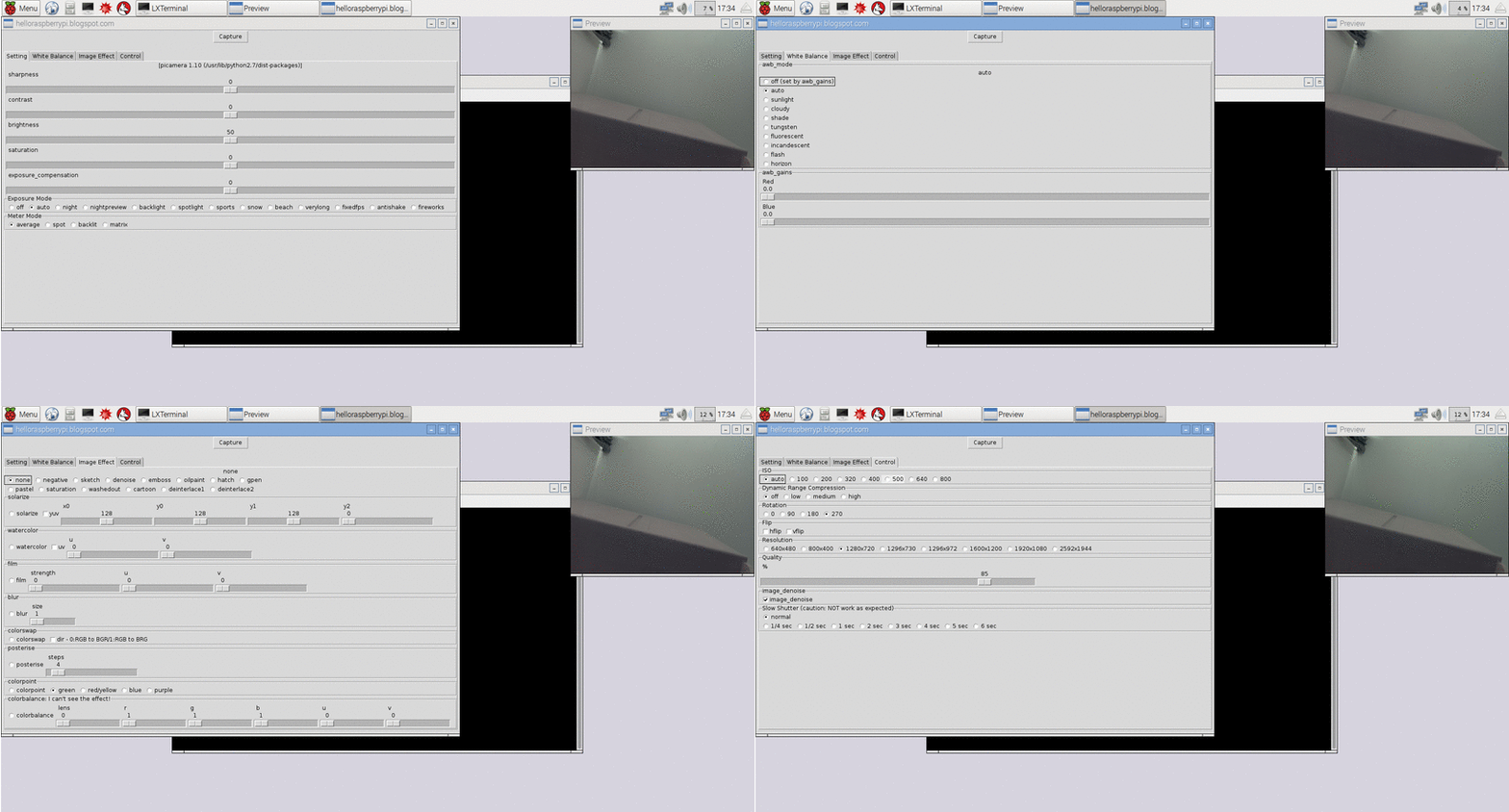
- Next version of the Python script to take Timelapse photos.

